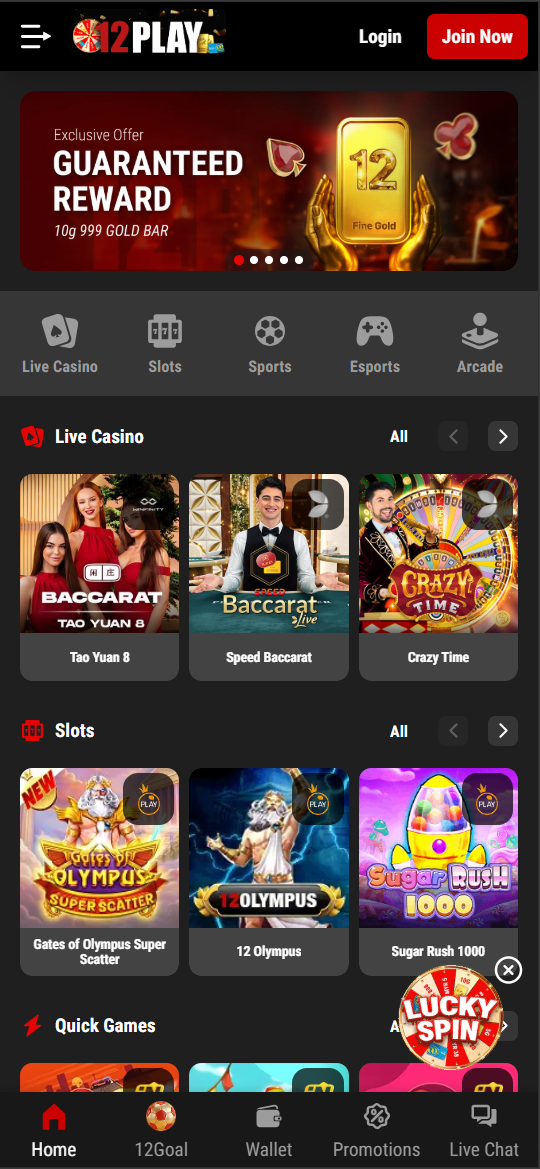
Mobile gaming is now the dominant way players in Malaysia and Southeast Asia interact with online casinos and sportsbooks, and 12Play has been built with this reality at its core. The platform delivers a fully-featured Progressive Web App (PWA) experience through any modern mobile browser, alongside a dedicated Android APK for players who prefer a native app-like installation. Every game, every betting market, every bonus and every payment method available on desktop is accessible in full on mobile.
Two Ways to Play 12Play on Mobile
| Method | Android | iOS (iPhone/iPad) | No Install? | Auto-Updates? |
|---|---|---|---|---|
| Mobile Browser (PWA) | ✅ Chrome, Samsung Browser | ✅ Safari, Chrome | ✅ Yes | ✅ Always latest |
| Android APK | ✅ Direct APK install | ❌ Not available | ❌ Requires install | Manual update needed |
Option 1: Mobile Browser (Recommended for All Players)
The simplest way to play 12Play on mobile requires absolutely no download. Simply open your preferred mobile browser, navigate to the 12Play website, and the responsive PWA automatically adapts to your screen. The mobile web experience delivers:
- Full access to all 1,000+ casino games and the complete sportsbook
- Live casino streaming optimised for mobile bandwidth
- Touch-friendly interface with swipe navigation between game categories
- Deposits and withdrawals via FPX, e-wallets and crypto — all mobile-native
- Real-time live betting with odds that update seamlessly on-screen
- Push notifications (if you add 12Play to your home screen via "Add to Home Screen")
Add to Home Screen (iOS — Safari)
- Open Safari and navigate to the 12Play website.
- Tap the Share icon (square with upward arrow) at the bottom of the screen.
- Scroll down and select "Add to Home Screen".
- Confirm the name and tap Add.
- A 12Play icon now appears on your home screen — tap it for a full-screen, app-like experience.
Add to Home Screen (Android — Chrome)
- Open Chrome and visit the 12Play website.
- Tap the three-dot menu in the top-right corner.
- Select "Add to Home screen".
- Tap Add to confirm.
- Launch from your home screen for a borderless, app-like session.
Option 2: Android APK — Direct Installation
For Android users who prefer a dedicated application, 12Play provides an APK (Android Package Kit) for direct installation. The APK offers a slightly faster launch experience and dedicated push notifications for promotions and balance updates.
How to Download & Install the 12Play APK
- On your Android device, go to Settings → Security (or Privacy on newer Android) and enable "Install from Unknown Sources" or "Install Unknown Apps" for your browser.
- Visit the official 12Play website and tap the Download APK button.
- Once downloaded, open the APK file from your notification shade or Downloads folder.
- Tap Install when prompted, then Open once installation completes.
- Log in with your existing credentials or create a new account.
⚠️ Security Note: Only download the 12Play APK from the official 12Play website. Never install APK files from third-party app stores, Telegram groups or unofficial sources, as these may contain malware or modified code.
| APK Requirement | Specification |
|---|---|
| Operating System | Android 6.0 (Marshmallow) or higher |
| Storage Required | ~45 MB |
| RAM Recommended | 2 GB minimum, 3 GB+ for live casino |
| Internet Connection | 4G or Wi-Fi recommended (3G minimum) |
| Auto-Updates | Manual — check for updates in app settings |
Mobile Gaming Performance Tips
- Use Wi-Fi or 4G/5G for live casino games and live sports streaming — 3G may cause buffering on HD video tables.
- Close background apps on older devices to free up RAM before launching high-graphic slot titles.
- Enable notifications through the browser or APK to receive real-time alerts for promotions, deposit confirmations and withdrawal status.
- Keep your browser updated — Chrome 90+ and Safari 14+ deliver the best PWA performance.
- Use screen orientation lock in landscape mode for the live casino interface on smaller phones for a wider table view.
Mobile Payments — Deposit on the Go
All of 12Play's payment methods work seamlessly on mobile. E-wallet payments (Touch 'n Go, GrabPay, Boost) are especially convenient because the app-to-app redirect makes deposits complete in under 30 seconds. DuitNow QR lets you open your banking app's QR scanner and confirm instantly. USDT transfers via a mobile crypto wallet (Trust Wallet, Binance app) are fully supported.